27 AI models inside Photoshop.
No exporting. No browser tabs. No Adobe credit meter. Make a selection, describe what you want, and the result comes back on your canvas as a masked layer — ready to blend, mask, and finish the way you always have.
Watch it in action
This is what it looks like
inside Photoshop.
Sixty seconds, no narration. Keep scrolling — it starts on its own.
"Genuinely in awe of some of the results. I've edited very old photos — each time, my wife says 'Oh my god!' Thank you for a remarkable plugin."
"Your plugin has allowed us to escape Adobe's punitive billing for AI features and really control how much we spend. We get much better results."
"BLOWN AWAY with the results. I would need a Hollywood budget to build the sets and hire human actors to fulfill my client's expectations."
"This is a piece of work. My respect. Exactly what I needed for commercial projects. Really looking forward to buying and trying this."
"Used it to restore my grandparents' wedding photos from the 1940s. This tool is awesome."
"Compared to the AI features in Adobe Photoshop, which are both expensive and difficult to use, your plugin is much more user-friendly and affordable."
"Definitely worth buying the plugin. Kie is better than Replicate, more affordable, and even generates results faster."
"I use this plug-in ALL day long since November! You make my work load easier."
"The best out there, by far! The updates bring useful features regularly. And IT'S NOT A SUBSCRIPTION! NO MONTHLY FEES!"
"Impressive as always! I can't believe you're able to keep up with all the weekly AI model releases."
"Genuinely in awe of some of the results. I've edited very old photos — each time, my wife says 'Oh my god!' Thank you for a remarkable plugin."
"Your plugin has allowed us to escape Adobe's punitive billing for AI features and really control how much we spend. We get much better results."
"BLOWN AWAY with the results. I would need a Hollywood budget to build the sets and hire human actors to fulfill my client's expectations."
"This is a piece of work. My respect. Exactly what I needed for commercial projects. Really looking forward to buying and trying this."
"Used it to restore my grandparents' wedding photos from the 1940s. This tool is awesome."
"Compared to the AI features in Adobe Photoshop, which are both expensive and difficult to use, your plugin is much more user-friendly and affordable."
"Definitely worth buying the plugin. Kie is better than Replicate, more affordable, and even generates results faster."
"I use this plug-in ALL day long since November! You make my work load easier."
"The best out there, by far! The updates bring useful features regularly. And IT'S NOT A SUBSCRIPTION! NO MONTHLY FEES!"
"Impressive as always! I can't believe you're able to keep up with all the weekly AI model releases."
Feeling inspired? Start creating with AI today.
Ten things Eti Image couldn't do last month.
Relight a photo from scratch. Extend beyond the frame. Upscale in one second. And every generated layer now arrives already masked to your selection.
Relight any photo
Golden hour from the left. Hard studio key. Neon at night. Pick a preset or describe the light you want — Magnific rebuilds the entire lighting of the shot, shadows and all.
Expand past the frame
Add up to 1024px on any side and let AI invent what was never in shot. The result lands at the right scale over your original and the canvas grows itself — no cropping, no resizing.
Layers arrive pre-masked
Lasso a jacket, ellipse an eye, hit Select Subject — every generated layer now comes back with a mask shaped exactly like your selection. It blends into the photo instead of landing as a rectangle.
Pruna — upscale in a second
The fastest upscaler we've ever shipped. 2×–8× with optional realism and detail enhancement, finishing in about a second, from half a cent an image.
Errors that actually help
No more silent "Failed". You see the reason the AI provider gave, and for billing or key problems the message names the right service and links straight to the page where you fix it.
Six interface languages
English, Chinese, Spanish, French, German — and now Persian, with a properly bundled font so it reads cleanly on both Mac and Windows.
Already own Eti Image? Version 3.0 is a free update.
Get Eti Image v3You've seen the claims. Drag the handle.
Same file, same session. Left is what walked in — right is what walked out.
Photo Restoration
Old, damaged photo brought back to life


AI Upscaling
Low-res image sharpened up to 10× with Crystal


Two modes. One plugin.
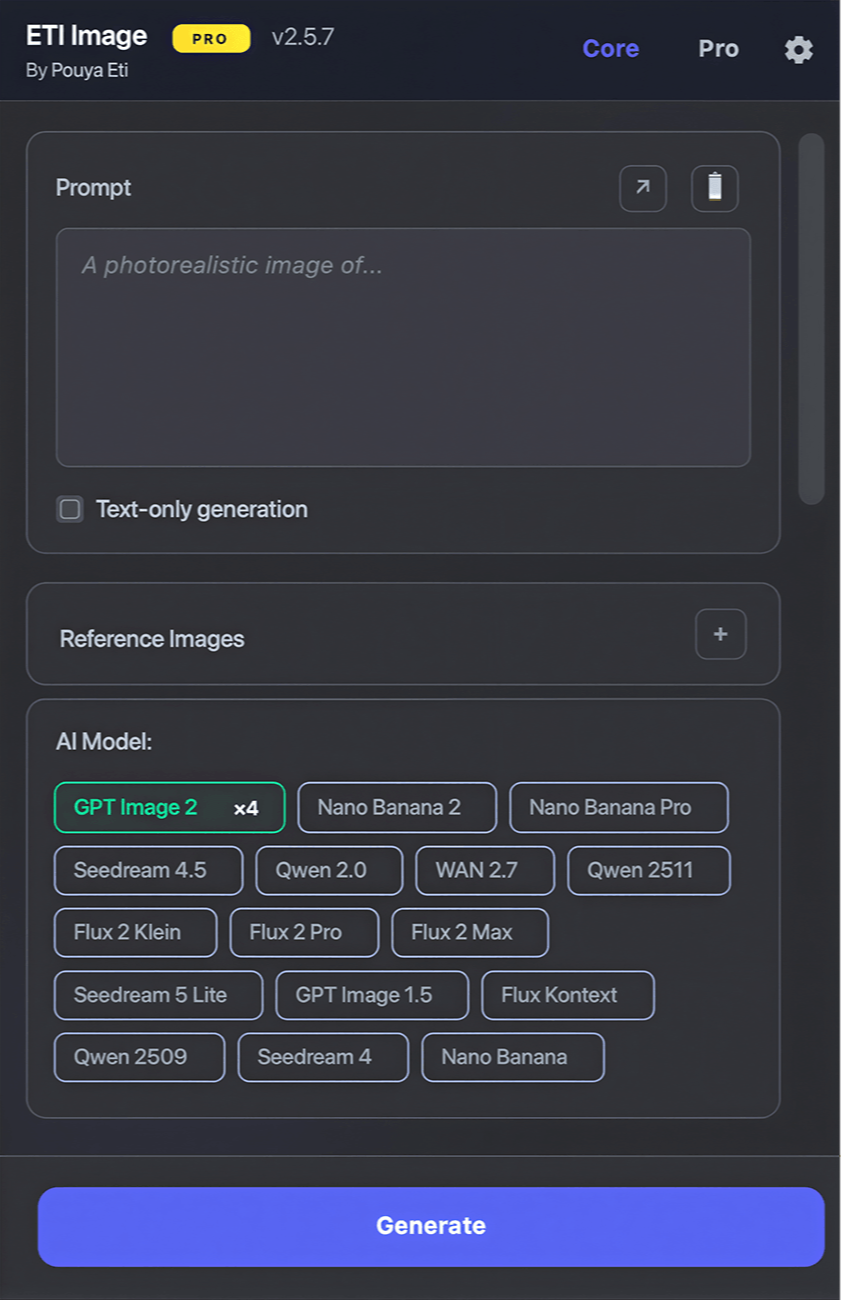
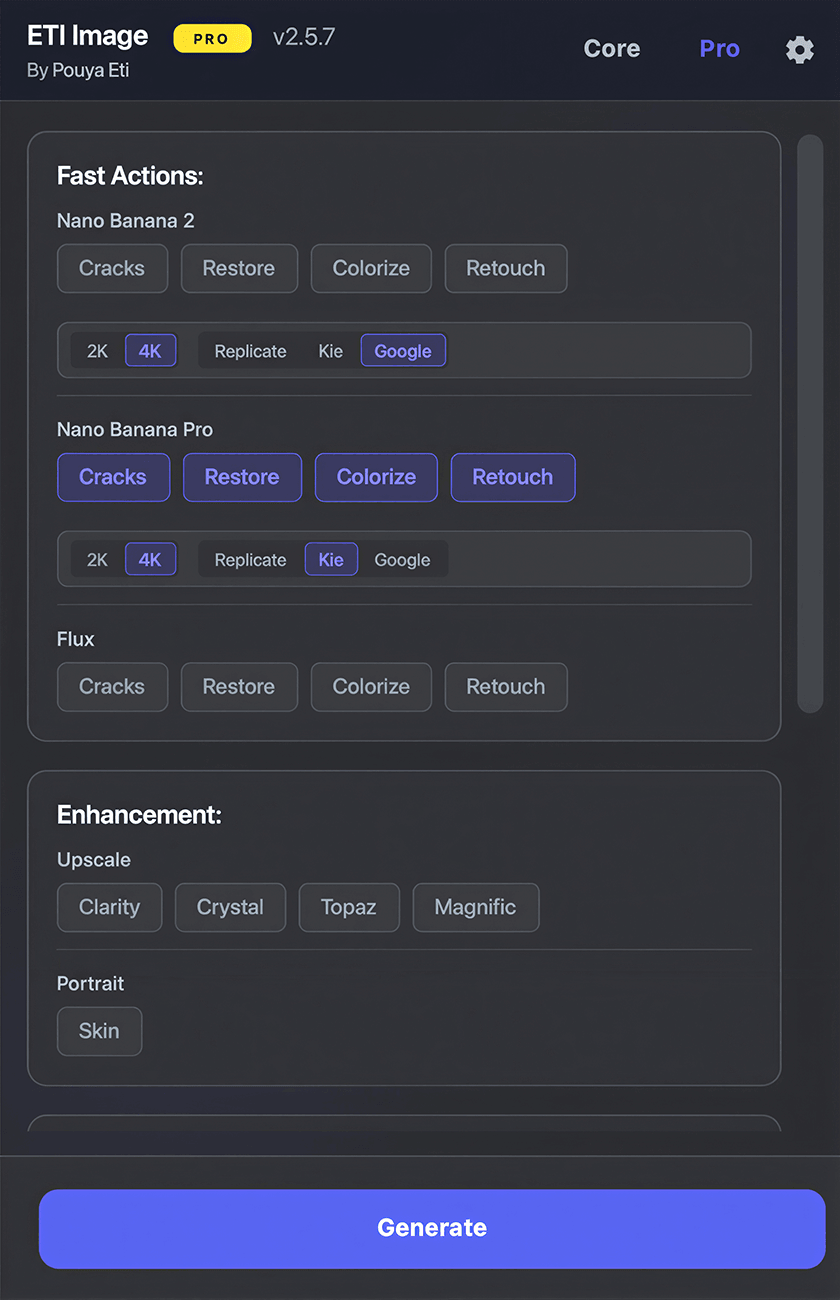
Flip between Core for AI generation and Pro for Fast Actions, upscalers, and advanced tools — all without leaving Photoshop.
Generate & Edit
23 AI models with per-model settings, reference images, and parallel multi-model generation.
Enhance & Automate
Fast Actions, 5 premium upscalers, and JSON Extract — AI image analysis in one click.
What You Can Do
Professional AI-powered image creation and editing, right inside Adobe Photoshop.
Smart Selection Editing
Select any region and transform it with AI. Change colors, textures, styles, or swap elements — the rest stays untouched. Every result comes back masked to the shape you selected.
Relight & Expand
Change the entire lighting of a shot from a preset or a reference photo, or extend the image up to 1024px beyond its edges — with the canvas resized and the result placed for you.
Text-to-Image up to 4K
Generate entirely new images from text prompts in resolutions up to 4K. Choose from 17 AI models for the perfect result.
Parallel Multi-Model
Run multiple AI models simultaneously. Queue new requests anytime — no need to wait for previous generations to finish.
Reference-Guided Edits
Upload reference images to guide style, lighting, and materials. Show the AI exactly what you want.
One-Click Fast Actions
Restore, colorize, retouch, and repair with pre-built AI workflows — now running on Seedream 5 Pro. Professional results in a single click.
JSON Extract
Analyze any selection with Kimi K2.5 or Claude Sonnet 4.6 to extract structured JSON — objects, colors, lighting, camera, mood, and poses — ready to use as editing prompts.
Prompt History & Favorites
Every prompt is saved automatically. Star the best ones, name them by use case, and reuse them anytime — favorites even survive updates and reinstalls.
Prompt Library & Product Views
22 one-click portrait styles — from studio looks to watercolor and Pixar — plus a Product Views generator that renders your product from any angle. Each preset runs on the model it was written for.
Ready to bring all of this into your Photoshop?
Choose your plan0 AI models to choose from.
No single model wins at everything — so you don't get stuck with one. From OpenAI, Google, and ByteDance to Black Forest Labs, Alibaba, Topaz and Magnific: pick the right model for each job, and switch any time.
Generation & Editing / 17 models
Turn text prompts or selections into brand-new images, or edit what's already on the canvas.
Seedream 5 Pro
ByteDance's flagship image model — 1K/2K output, up to 10 reference images, and exact input matching. Available via Replicate.
Nano Banana 2 Lite
Google's speed-focused Gemini image model. Fast 1K generation and editing at just $0.02 per image. Available via Kie.ai.
GPT Image 2
OpenAI's latest image model with excellent prompt adherence, text rendering, and detailed edits. Available via Replicate or Kie.ai.
Nano Banana 2
Google Gemini Flash-powered. Fast generation with web and image search grounding. Available via Replicate, Kie.ai, or Google.
Qwen 2.0
Alibaba's unified image model for realistic generation, structured text rendering, native 2K output, and flexible editing. Available via Kie.ai.
WAN 2.7
Alibaba's image generation and editing model with Base and Pro versions, up to 4K resolution. Available via Kie.ai.
Seedream 5 Lite
ByteDance's fast model with generation up to 3K resolution and 9 aspect ratios. Available via Replicate or Kie.ai.
GPT Image 1.5
OpenAI's model with excellent prompt understanding and transparent background support.
Flux 2 Pro
Fast, high-quality generation with excellent text rendering. Up to 4MP resolution.
Flux 2 Max
Highest fidelity model from Black Forest Labs with superior detail and quality.
Flux 2 Klein
Lightning-fast image generation. Perfect for quick iterations and rapid prototyping.
Seedream 4.5
ByteDance's model with 4K support, custom dimensions, and multiple aspect ratios. Available via Replicate or Kie.ai.
Seedream 4
Fast, reliable generation with excellent quality. Great for quick iterations.
Nano Banana Pro
Google Gemini 3-powered. Excellent for multi-subject images and complex scenes. Available via Replicate, Kie.ai, or Google.
Qwen 2511
Enhanced image editing model with better consistency and quality. Latest from Qwen.
Qwen 2509
Advanced image editing with Go Fast mode. Great for style transfers and detailed edits.
Flux Kontext
Professional context-aware editing. Perfect for retouching and precise modifications.
Enhancement & Analysis / 10 models
Upscale, relight, extend, repair, and analyze images you already have — ideal for finishing work in Photoshop.
Magnific Relight
Rebuild the lighting of any photo — golden hour, hard studio key, neon night — from a preset, your own description, or a reference image.
Magnific Expand
Outpaint up to 1024px on any side, placed at the correct scale with the canvas grown automatically. Runs on Flux Pro.
Pruna Upscaler
The fastest upscaler available — 2×–8× in about a second, with optional realism and detail enhancement. From $0.005 per image.
JSON Extract — Kimi K2.5
AI image analysis via Replicate. Extract structured JSON — objects, colors, camera, lighting, mood, weather, and poses — to use as editing prompts.
JSON Extract — Sonnet 4.6
Claude Sonnet 4.6 via Kie.ai for image analysis. Same JSON extraction with Anthropic's advanced reasoning capabilities.
Topaz Upscale
Premium upscaling with 5 enhance models, face enhancement, and up to 6x scale.
Crystal Upscaler
AI upscaling up to 10x with dynamic pricing based on output resolution.
Clarity Upscaler
AI upscaling up to 4x with creativity, resemblance, and dynamic controls.
Magnific Upscaler
Creative, Precision V1 and Precision V2 engines — up to 16× with creativity, HDR, resemblance and ultra-detail controls.
Magnific Skin Enhancer
Portrait skin retouching in Creative, Faithful, or Flexible mode — with sharpen, smart grain, skin detail, and five optimisation targets.
See What's Possible
Real examples of what you can create with Eti Image.
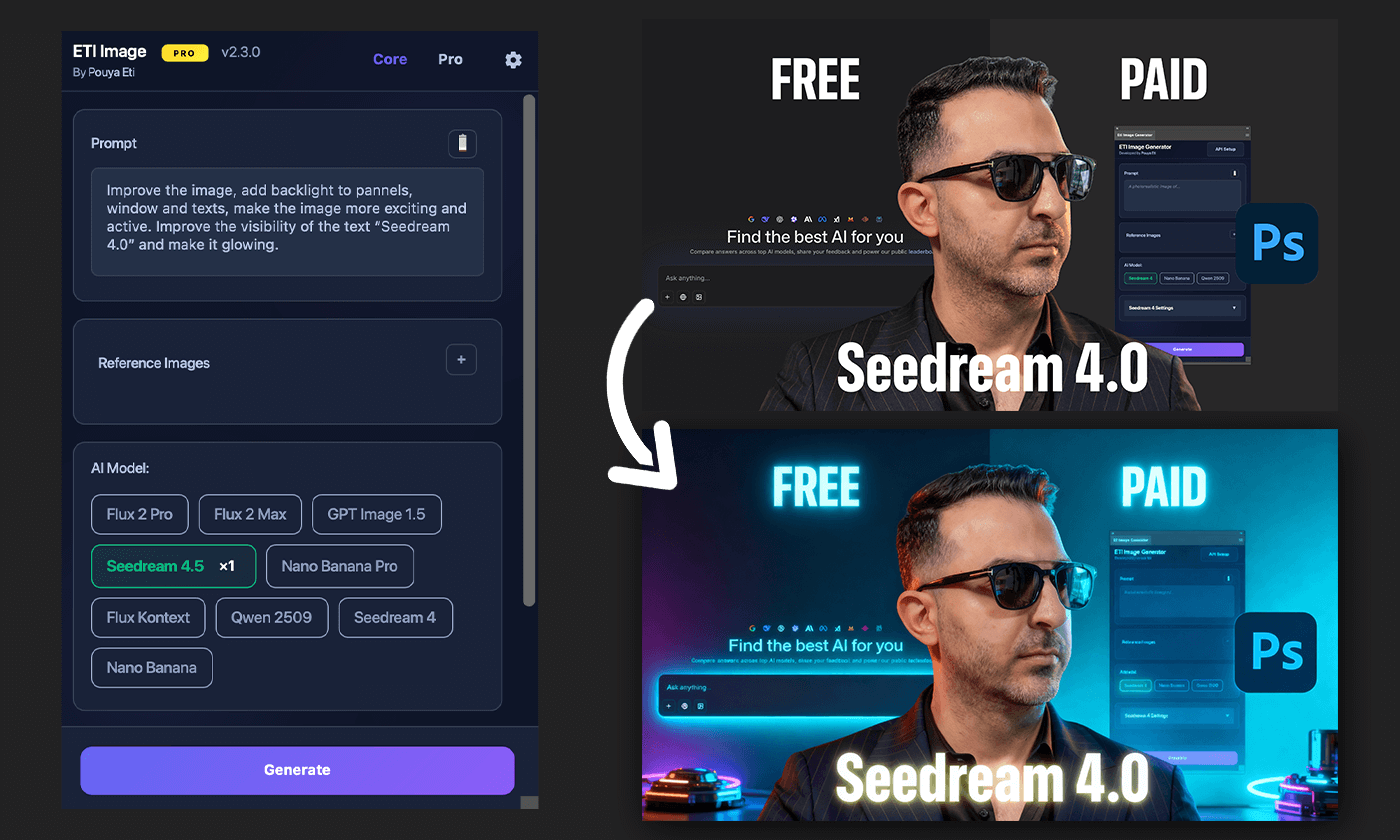
YouTube Thumbnails
Add dramatic lighting, effects, and styles to simple compositions. Turn basic photos into eye-catching thumbnails.
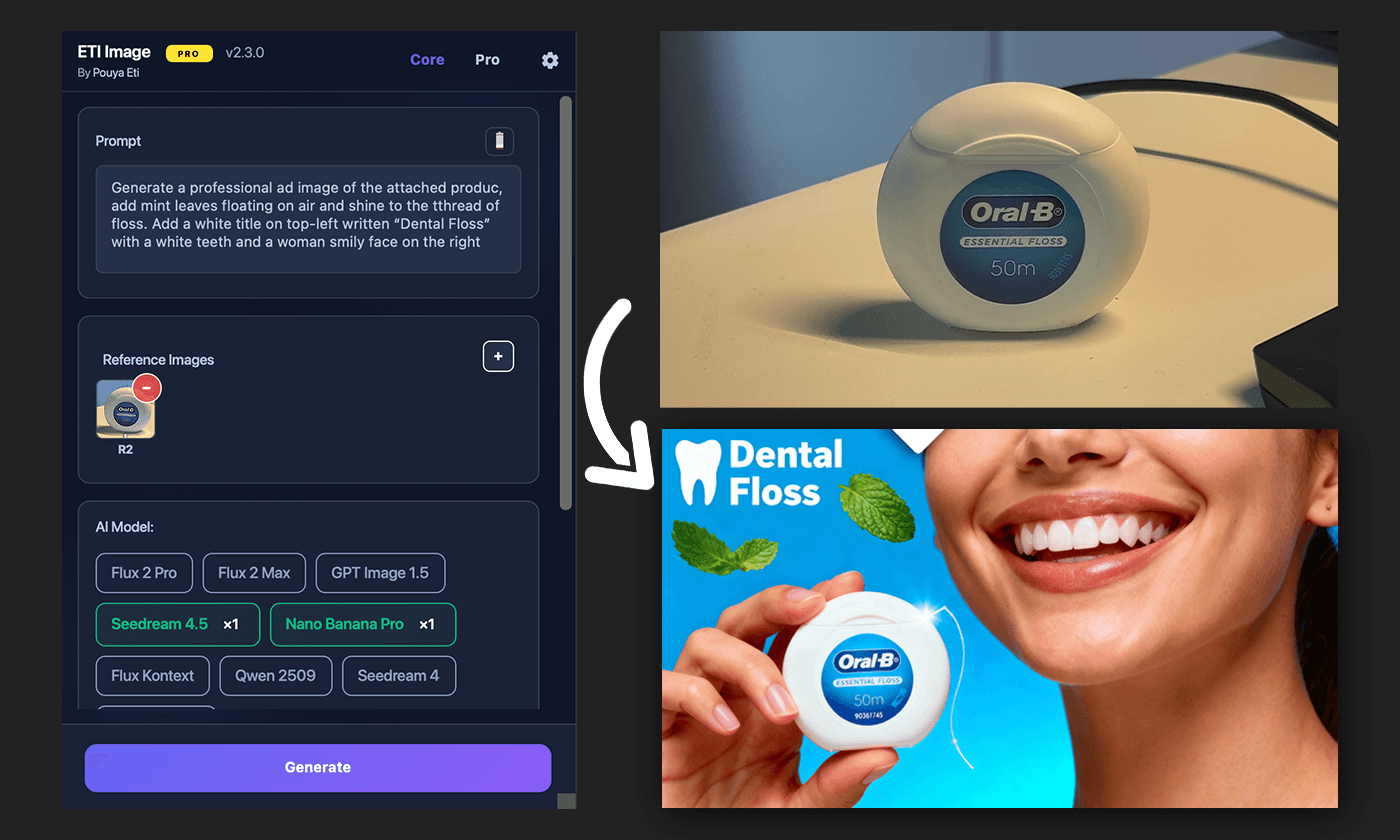
Product Photography
Transform product photos into professional images. Generate multiple angles with transparent backgrounds.

Product Views Generator PRO
Upload any product photo and generate professional e-commerce images from all angles on a transparent background.
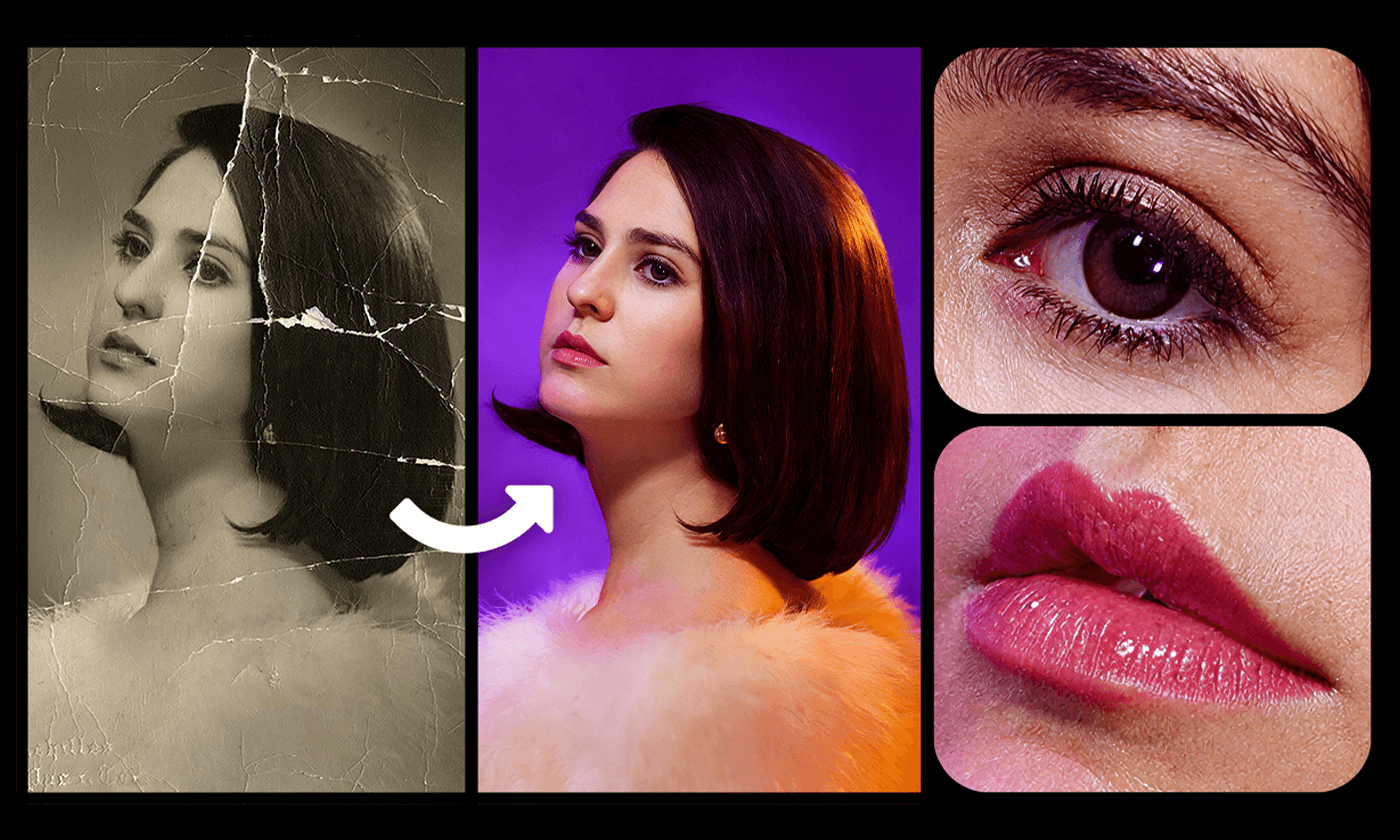
Restore & Enhance PRO
Repair old photos, colorize black & white, retouch faces, relight a whole scene, and upscale up to 16x with AI.
Imagine these in your next project.
Get Eti ImageWhat Creators Are Saying
Real feedback from plugin users on YouTube.
"I am genuinely in awe of some of the results. I've edited very old photos from my wife's side. Each and every time, she says, 'Oh my god!' Thank you for a remarkable plugin."
"Your plugin has allowed us to escape Adobe's punitive billing for AI features and really control how much we spend. We get much better results than what Adobe offers."
"This is a piece of work. My respect. This is exactly what I needed for commercial projects. I'm really looking forward to buying and trying this."
"Compared to the AI features in Adobe Photoshop, which are both expensive and difficult to use, your plugin is much more user-friendly and affordable."
"It was definitely worth buying the plugin. The changes that have been made are excellent. Kie is better than Replicate, more affordable, and even generates results faster."
"I am very satisfied with it, simply Super, and it's really fun to work with. Really appreciate you updating the plugin so quickly."
Regularly updated
New AI models, added as they drop.
Whenever a major AI image model launches, it lands in Eti Image — often within days of release.
-
Aug 2026v3.0.0 Major release
Relight, Expand, Pruna & automatic layer masks
The biggest update yet — Magnific Relight and Expand, the one-second Pruna upscaler, generated layers that arrive pre-masked to your selection, GPT Image 2 at 4K, full Skin Enhancer controls, Persian as a sixth language, and error messages that finally tell you what went wrong.
-
8 Jul 2026v2.6.0 New models
Seedream 5 Pro & Nano Banana 2 Lite added
ByteDance's flagship model and Google's fastest — plus favorite prompts with custom names, a 30-prompt history, and 9 new Prompt Library portraits.
-
23 May 2026v2.5.8 Feature
GPT Image 2 now up to 4K
Added the Kie.ai provider for GPT Image 2 with 1K/2K/4K output — plus three new interface languages (Spanish, French, German) and a new Photoshop Gray theme.
-
22 Apr 2026v2.5.6 New model
GPT Image 2 added
OpenAI's newest image model, inside Photoshop — with quality, aspect ratio, and output format controls.
-
3 Apr 2026v2.5.5 New model
WAN 2.7 Image added
Alibaba's image generation & editing model — Base and Pro variants, up to 4K output.
-
25 Mar 2026v2.5.4 Feature
Claude Sonnet 4.6 & Full-Screen Prompt Editor
Second AI provider for JSON Extract, plus a full-screen prompt view for long prompts.
-
21 Mar 2026v2.5.3 New model
Qwen 2.0 & JSON Extract launched
Alibaba's unified image model, plus AI-powered image analysis that outputs structured JSON prompts.
-
28 Feb 2026v2.5.0 New model
Nano Banana 2 added
Google's newest multi-subject image model, available across multiple providers.
-
25 Feb 2026v2.4.3 New model
Seedream 5 Lite added
ByteDance's fast, affordable generation model for quick iterations.
-
19 Jan 2026v2.4.1 New model
Flux 2 Klein + Text-only generation
Lightning-fast image generation and prompt-only generation (no selection required).
-
29 Dec 2025v2.4.0 Feature
Magnific Upscaler & Skin Enhancer
Creative & Precision upscaling modes plus AI-powered skin enhancement for portraits.
-
Plus many more updates since October 2025 — Qwen 2511, GPT Image 1.5, Flux 2 Pro & Max, Seedream 4, Nano Banana, and more. Updates continue regularly, especially when new AI models launch.
Five minutes from download to first image.
Four steps, once. After that you just select and type.
Get API Key
Sign up at replicate.com, kie.ai, or Google AI Studio, add credit, and copy your API token.
Install Plugin
Download the .ccx file and double-click to install via Creative Cloud.
Add API Key
Open the plugin in Photoshop and paste your token in settings.
Start Creating
Make a selection, enter your prompt, and generate amazing images.
Prefer to watch someone do it first?
The complete walkthrough — setup, API keys, selections, prompting, and every tab explained end to end.
Invest Once, Create Forever
No subscriptions. No recurring fees. Pay once and own it for life — including every future update.
Essential Tools
One-time payment · Lifetime updates
- 17 AI generation & editing models
- Up to 4K resolution output
- Parallel multi-model & queue generation
- 4 AI providers
- Reference image support
- Prompt history & auto-save
- Fast Actions & Premium Upscalers
- JSON Extract & Product Views
Complete Toolkit
One-time payment · Lifetime updates
- Everything in Core
- Fast Actions on Seedream 5 Pro — Restore, Colorize, Retouch, Repair
- 6 Premium Upscalers (up to 16x)
- Topaz Labs with face enhancement
- Product Views Generator
- Magnific Skin Enhancer, Relight & Expand
- Premium Prompt Library — 22 one-click styles
- JSON Extract — AI image analysis
- 6+ professional themes
Plugin price is one-time. Image generation requires credits on your API provider account (typically $0.01–$0.05 per image).
Questions, answered
Everything you need to know before you start.
Do I have to pay for the AI separately?
Is this a subscription?
How is this different from Adobe's built-in AI?
Will it work with my Photoshop?
Is it hard to set up?
I already own Eti Image. Do I pay for version 3?
Do I need a Magnific subscription for Relight and Expand?
What if it doesn't work for me?
Requirements
Operating System
macOS or Windows 10/11
Photoshop Version
Photoshop 2023 or higher
Internet & API
Internet + Replicate, Kie.ai, or Google AI account
About API Costs
You need to add credit to your Replicate, Kie.ai, or Google AI account to generate images. Each generation costs approximately $0.01 – $0.30 depending on the model, provider, and resolution. You control your spending — only pay for what you use.
14-Day Money-Back Guarantee
Try Eti Image risk-free. If it's not right for you, email us within 14 days of your purchase for a full refund — no hard feelings. Read the refund policy.